
Links are very essential when you do blogging. When you link your site, you are creating ways on how to make your site more accessible to various readers and audience surfing the internet. Incoming links are very important in creating a successful blog.
Links provide blogs more authority and credibility on Technorati and can gain higher Page Ranks in Google. If you have good ratings on those two, your site can ensure an influx of advertisers you can make profit out of high advertising rates. If your site has a lot of followers, you can have more opportunity to increase your profit.
Google search engine rankings will be higher if you have incoming links growing.
With more traffic, comes more ad offers, through this there is greater potential for pay per click advertisements to be accessed by visitors which entails more profits for you. Here are some tips to ponder on how to create free links to your blog.
Tip#1: Write blog posts which are wanted to be read by people. One of the easiest ways in getting people to visit your blog is to publish great posts. If you write blog content which are interesting, helpful and informative, people will want to discuss about your posts on their respective blogs and share them with others which entails more links back to your blog.
Tip#2: Get your blogrolls moving. Once you have written a good amount of well written content to your site, you can start approaching other bloggers online with equal or more ranking or authority than you and suggest a blogroll of reciprocal links. This method is most effective when both blogs are related to the same subjects. Leaving comments on other blogs prior to establishing an exchange of blogroll link with fellow bloggers can ensure more links back to your site.
Tip#3: Blog directories should be your priority. Submit your blog site to blog directories where you can enjoy the privilege of adding a link to your blog such as BlogHer. BlogCatalog and MyBlogLog can provide you with the opportunity to increase the incoming links to your site through registration alone.
Tip#4: Blog contests can do the trick! Hold blog contests in order to achieve greater way of driving traffic to your post and eventually increase on the incoming links to your site. Blog contest promotional sites can promote your blog contest and add links back to your site. You can impose some contest rule to write a blog pertaining to the contest on their specific blogs with a back link to the original blog contest page.
Another hype that has struck the blogosphere is raking in a lot of attention. Guest blogging is gaining popularity among bloggers who are on the look into creating more links to various blog readers while increasing traffic to their own blog.
Guest blogging can be done in two ways:
1. You can do guest blogging on your own blog site. This can be done with someone is writing a post for you to publish on your site. You can always request a blogger to write a post for you.
2. You can write blog posts for another person's site. You can always ask a blogger whose site is much appealing to you and provide a guest post for you eventually
Guest blogging is really effective in raking in a growing population of audience for your blog. Just imagine the possibilities of widening your range of audience.
Increase the Traffic to your blog site through Guest Blogging
When you do guest blogging for other blog site, you are trying to introduce yourself to the audience and readers of a specific blog.
It is very important to submit a guest posts to a blog which have created or established a steady inflow of traffic. Increasing traffic to a blog can be done as well if the guest blogger can promote your blog as well to his or her readers through his own blog. It is an easy way of raking in traffic to your site.
Guest blogging is a win-win situation for both bloggers who are engaging in this method of traffic generation. It helps in growing contacts and audience while strengthening the working ties on other bloggers in the internet.
A home page for you blog is really important. If you want your blog site to achieve success, you must invest a lot of effort in building a home page to convince followers.
A home page is also called as a landing page. This is one of the most essential parts of the blog which welcomes your visitors. Your home page should be full of information and useful tools to help readers feel more compelled in sticking to your blog.
A home page that is confusing or has lacking information can have a negative impression on your readers. You must take your time in creating a landing page which is very easy to navigate and has a lot of information regarding a niche.
Here are some simple tips to ponder on how to create a smashing home page:
Tip#1: Before you start off building your site, consider the appeal and image your want your blog to appear to your reader. It is very important to create and define your identity and the messages you want to convey to your probable readers. When you define your image for your blog, you are creating a brand worth remembering. Your readers will associate your image on the type of niche or blog you want to have.
Tip#2: Bloggers must see to it that your visitors must have an experience worth treasuring when they hop into your blog.
Incorporate elements which are useful to your readers. Include some of the features below:
o About page – an about page can give your readers an idea of what you do and what you are as a blogger. You can include here a lot of information regarding your brand and what you want to offer
o Posts – include posts which are full of information and relevant to your niche
o Categories – categories can help readers navigate around your blog. This can give your readers an efficient way of sorting into categories which they are more interested with
o Blogroll – blogrolls work best if you have a lot of posts which you update most of the time. Readers can keep track of what is the latest feeds on your blog
o Contact page – people would love to talk to the bloggers on certain queries about a post or just give feedback. Hearing from what people think of your blog can make room for changes and improvements
o Subscription options – if you have subscription options, you can rake in loyal readers from time to time
Tip#3: When you are creating your blog home page, keep in mind that your blog design should always reflect the image of your blog. See to it that your blog design should portray an image that would represent your blog the most. Font styles and sizes , color and lay out should fit the niche you have.
Blog writing has been gaining popularity among those who are looking for some viable options on how to establish a presence in the internet. Blog posts are the most effective way of raking in readers and traffic to your site.
The more visitors you have the greater is the possibility for increased profitability.
Here are top five tips to help those who are looking to achieve an excellent blog post:
Tip# 1. Speak your mind and make your opinion known to your readers. Blogs are what people usually are looking for. These blogs are written by individuals and not by companies. People are after what people are thinking of. They want to know more on what are the opinions of other people who are also interested with what they are looking for.
Tip# 2. Give ample attention to building your links. Look for various websites which are discussing the same niche as you have. You must support your blog post with a lot of links on various web pages similar to your niche.
Tip# 3. Keep your posts on a minimal number of words. A minimum amount of words is preferable with a maximum amount of information. Keep your articles full of information without overdoing the number of words. You can make 250 words as a blog post.
Tip# 4. Always keep an eye on how you write your blog post. Try to contain what you want to say in your title. Lists and bullet points are in a more digestible format. People prefer bulleted information since it creates a more readable post.
Tip# 5: When you write your blog post, always keep in mind to include the keywords for a specific niche. These keywords will help in raking in traffic to your blog. Search engines are more friendly to keyword rich articles and they put your blog upfront once internet users key in the words you have in your blog.
Almost everyone today writes a blog from celebrities to probably even you. What if you could make money off your blog? In order to make money on your blog you need to have a lot of readers. Making your blog easy to find and appealing to potential readers is the first step. In order for potential readers to find your blog easily you need it to appear in the search results in a search engine like Google and you want to be as near to the top as possible. You also need to have a blog that is interesting and relevant.
One way to get your page to the top of the search results is through permalinks. Permalinks are permanent links to every post on your blog and contains your blogs title. Search engine bots use permalinks to classify and catalog blog posts. Browsers also use these links when finding ways to remote Web pages. Permalinks are created automatically in most blogging programs but you have the ability to edit them. Sometimes the automatic permalinks that are created is just your blog title with hyphens in place of the spaces. So the first thing to do if you want to increase your readership and income is to edit your permalinks. Make your permalinks concise but descriptive.
Link building is another way to increase traffic to your site. Look at sites that are similar to yours and look at the links they have. This will give you an idea of the kinds of organizations that you can approach to place a link on your page and to your page. It is best to get help from a professional service in order for you to obtain quality traffic to your site that is related to your business.
Content is the main reason people come to your site, revisit, and recommend it to friends. Article writing is how you get content into your blog. You can get ideas for content from your family and friends. Listen to stories and write them up. Keep a notebook handy to jot down ideas when you think of them and then expand upon them later. Watch TV; listen to the news, and keeping an eye out for trends will give you lots of ideas for writing content. Keep your eyes and ears open for ideas and you will have an endless list of topics to write about.
A good tip to follow when blogging is to make updates regularly as search engines look for content that is fresh. Don't wait weeks of months to update information on your blog. Leave good comments on other sites with links to your site to attract visitors back to your site. Look at your web stats. Post original content that is relevant and interesting. Find a blog site that you are comfortable using and that offers widgets, themes and other tools that help to make your blog attractive and interesting. The blog site can give you a lot of information that will help you develop your blog to be a success.
January 30, 2010


About Blogging : Top 3 Tips for Guest Bloggers
Guest blogging is a win-win situation for both bloggers who are engaging in this method to increase traffic generation opportunities for their respective blogs. It very important to grow your contacts and audience while strengthening the working ties on other bloggers in the worldwide web.
Guest blogging is gaining popularity among bloggers who are on the look into creating more links to various blog readers while increasing traffic to their own blog.
When you are contacting another blogger for a guest post, always seek to ask him or her if you can suggest a guest post to be published on their own blog.
Follow the steps below so you can increase your chances of getting your guest post accepted immediately:
Tip#1: Before you submit a guest post, make sure you have ample information on the blog where you will submit a guest post. You will surely have greater chances of approval from another blogger if your guest post on a specific site if you take extra effort to get to know more about the blogger, the niche, the content and the majority of audience patronizing that blog.
Take a trip down the archives of the site so you can read through the trend of articles and topics posted on the site. If you read through the comments, you must see to it that you can measure the acceptable blogs which has a lot of good and excellent comments. The guest post that you will submit should fill in the gaps and the go with the standards of the written contents for a specific blog.
Tip#2: Your credentials are essential in establishing a relationship with other bloggers. As a guest blogger, it is your responsibility to provide your credentials so the blogger you are trying to connect with would know that you have the credibility and the track record to warrant an outstanding guest post. Your credentials can help the bloggers understand why you are the right person for a guest post and why readers should take heed to what you have in mind.
Tip#3: Blog statistics are needed if you want to venture into guest posting. You should always provide your blog statistics so the other blogger would know you have the right figures to ensure a worthy post from you.
Try sharing your monthly unique visitors stats and page view figures, Alexa rankings, Google and Technorati ratings as well. Include all stats which could showcase that a guest post written by you can provide useful links and increase traffic when you promote something in your blog.
Guest blogging is gaining popularity among bloggers who are on the look into creating more links to various blog readers while increasing traffic to their own blog.
When you are contacting another blogger for a guest post, always seek to ask him or her if you can suggest a guest post to be published on their own blog.
Follow the steps below so you can increase your chances of getting your guest post accepted immediately:
Tip#1: Before you submit a guest post, make sure you have ample information on the blog where you will submit a guest post. You will surely have greater chances of approval from another blogger if your guest post on a specific site if you take extra effort to get to know more about the blogger, the niche, the content and the majority of audience patronizing that blog.
Take a trip down the archives of the site so you can read through the trend of articles and topics posted on the site. If you read through the comments, you must see to it that you can measure the acceptable blogs which has a lot of good and excellent comments. The guest post that you will submit should fill in the gaps and the go with the standards of the written contents for a specific blog.
Tip#2: Your credentials are essential in establishing a relationship with other bloggers. As a guest blogger, it is your responsibility to provide your credentials so the blogger you are trying to connect with would know that you have the credibility and the track record to warrant an outstanding guest post. Your credentials can help the bloggers understand why you are the right person for a guest post and why readers should take heed to what you have in mind.
Tip#3: Blog statistics are needed if you want to venture into guest posting. You should always provide your blog statistics so the other blogger would know you have the right figures to ensure a worthy post from you.
Try sharing your monthly unique visitors stats and page view figures, Alexa rankings, Google and Technorati ratings as well. Include all stats which could showcase that a guest post written by you can provide useful links and increase traffic when you promote something in your blog.
About Blogging : Top 3 Tips for Guest Bloggers
Guest blogging is a win-win situation for both bloggers who are engaging in this method to increase traffic generation opportunities for their respective blogs. It very important to grow your contacts and audience while strengthening the working ties on other bloggers in the worldwide web.
Guest blogging is gaining popularity among bloggers who are on the look into creating more links to various blog readers while increasing traffic to their own blog.
When you are contacting another blogger for a guest post, always seek to ask him or her if you can suggest a guest post to be published on their own blog.
Follow the steps below so you can increase your chances of getting your guest post accepted immediately:
Tip#1: Before you submit a guest post, make sure you have ample information on the blog where you will submit a guest post. You will surely have greater chances of approval from another blogger if your guest post on a specific site if you take extra effort to get to know more about the blogger, the niche, the content and the majority of audience patronizing that blog.
Take a trip down the archives of the site so you can read through the trend of articles and topics posted on the site. If you read through the comments, you must see to it that you can measure the acceptable blogs which has a lot of good and excellent comments. The guest post that you will submit should fill in the gaps and the go with the standards of the written contents for a specific blog.
Tip#2: Your credentials are essential in establishing a relationship with other bloggers. As a guest blogger, it is your responsibility to provide your credentials so the blogger you are trying to connect with would know that you have the credibility and the track record to warrant an outstanding guest post. Your credentials can help the bloggers understand why you are the right person for a guest post and why readers should take heed to what you have in mind.
Tip#3: Blog statistics are needed if you want to venture into guest posting. You should always provide your blog statistics so the other blogger would know you have the right figures to ensure a worthy post from you.
Try sharing your monthly unique visitors stats and page view figures, Alexa rankings, Google and Technorati ratings as well. Include all stats which could showcase that a guest post written by you can provide useful links and increase traffic when you promote something in your blog.
Guest blogging is gaining popularity among bloggers who are on the look into creating more links to various blog readers while increasing traffic to their own blog.
When you are contacting another blogger for a guest post, always seek to ask him or her if you can suggest a guest post to be published on their own blog.
Follow the steps below so you can increase your chances of getting your guest post accepted immediately:
Tip#1: Before you submit a guest post, make sure you have ample information on the blog where you will submit a guest post. You will surely have greater chances of approval from another blogger if your guest post on a specific site if you take extra effort to get to know more about the blogger, the niche, the content and the majority of audience patronizing that blog.
Take a trip down the archives of the site so you can read through the trend of articles and topics posted on the site. If you read through the comments, you must see to it that you can measure the acceptable blogs which has a lot of good and excellent comments. The guest post that you will submit should fill in the gaps and the go with the standards of the written contents for a specific blog.
Tip#2: Your credentials are essential in establishing a relationship with other bloggers. As a guest blogger, it is your responsibility to provide your credentials so the blogger you are trying to connect with would know that you have the credibility and the track record to warrant an outstanding guest post. Your credentials can help the bloggers understand why you are the right person for a guest post and why readers should take heed to what you have in mind.
Tip#3: Blog statistics are needed if you want to venture into guest posting. You should always provide your blog statistics so the other blogger would know you have the right figures to ensure a worthy post from you.
Try sharing your monthly unique visitors stats and page view figures, Alexa rankings, Google and Technorati ratings as well. Include all stats which could showcase that a guest post written by you can provide useful links and increase traffic when you promote something in your blog.
About Blogging : 5 Essential Tips to Write Blog Posts
Bloggers know the rule – content is king! Write worthwhile posts and your blog will skyrocket to success. Thus, building your content writing skills can ensure you a lot of profitability in the future – good contents can rake in readers which in turn can increase purchases of what you offer on your blog.
One of the most important keys to blogging success is providing exceptional content. Follow these five tips to make sure your blog posts not only get read but make people want to come back for more. Here are simple tips to follow to write a smashing blog post:
Tip#1: When you are writing a blog post, give ample attention to the tone of your blog. A target audience is very important and every blog should be written according to their quirks and their demands. Identify the goals for your blog as well as what your audience and readers are expecting to find in your site. Your writing style and tone should consistently keep up with what your target audience.
Tip#2: Always uphold honesty when writing a blog post. A blog written on an honest tone can show a lot about the writer. One of the most important components in writing is to develop your blog in honesty. Represent yourself and your blog with honest content so you can gain loyal readers.
Tip#3: Never risk your blog site in being accused by violation of copyrights. Keep in mind that plagiarism is a mortal sin amongst bloggers. Claiming others' work is tantamount to stealing. Always link back to the original source if you have to discuss specific information lifted from other sources. Proper attribution is essential in writing a blog post.
Tip#4: Do not fall into the trap of just overdoing list links. It can be very tempting to just list links to live contents for your readers to follow. Blogging is a time consuming activity and it can be a daunting task to do. Give your readers the right reasons to stick into your blog with the links which goes by a synopsis and a specific point of view regarding the links and the content. Keep this in mind – a link without a context will lead to losing your readers rather than just retain them.
Tip#5: Write your blog posts in short paragraphs. The visual appeal of your blog post is important as the content you have written. You do not want to bore your readers in reading through a novel posted on your site.
One of the most important keys to blogging success is providing exceptional content. Follow these five tips to make sure your blog posts not only get read but make people want to come back for more. Here are simple tips to follow to write a smashing blog post:
Tip#1: When you are writing a blog post, give ample attention to the tone of your blog. A target audience is very important and every blog should be written according to their quirks and their demands. Identify the goals for your blog as well as what your audience and readers are expecting to find in your site. Your writing style and tone should consistently keep up with what your target audience.
Tip#2: Always uphold honesty when writing a blog post. A blog written on an honest tone can show a lot about the writer. One of the most important components in writing is to develop your blog in honesty. Represent yourself and your blog with honest content so you can gain loyal readers.
Tip#3: Never risk your blog site in being accused by violation of copyrights. Keep in mind that plagiarism is a mortal sin amongst bloggers. Claiming others' work is tantamount to stealing. Always link back to the original source if you have to discuss specific information lifted from other sources. Proper attribution is essential in writing a blog post.
Tip#4: Do not fall into the trap of just overdoing list links. It can be very tempting to just list links to live contents for your readers to follow. Blogging is a time consuming activity and it can be a daunting task to do. Give your readers the right reasons to stick into your blog with the links which goes by a synopsis and a specific point of view regarding the links and the content. Keep this in mind – a link without a context will lead to losing your readers rather than just retain them.
Tip#5: Write your blog posts in short paragraphs. The visual appeal of your blog post is important as the content you have written. You do not want to bore your readers in reading through a novel posted on your site.
The Basic Requirements for A Successful Blog – Top 6 Tips to Be A Top Blogger!
A lot of us would want to excel in every thing that we do. If we engage in business, we want to achieve a more profitable status as much as a blogger would want to achieve a successful blog site.
If you want to achieve a successful blog site, you must follow some simple steps to achieve this goal for your blog. Here are some of the tips to work on to be a top blogger:
Tip#1: When you are writing your blog post, always write an article on something you are passionate of. You should write a blog post with much passion. This will ensure you of endless and countless ideas. Readers can tell if you write just for the heck of it or you are enjoying and writing from your heart.
Tip#2: Successful bloggers are committed to what they do. Dedication to your craft and hard work can bring a blog into a different level of success. When you are building a successful website you must always commit yourself into the tedious process of updating the blog and relentlessly promote it to rake in traffic. Commitment and sheer determination can bring your blog site into sure success!
Tip#3: Invest ample amount of time into building your blog. When you are starting a blog site, it is imperative that you provide time in delving into the posts you write and promoting your site. Top bloggers never grew tired of researching, updating and promoting in order to bring in readers to the blog site.
Tip#4: Writing a blog post should be done with what people are most interested in. Successful and top caliber bloggers are writing topics which have a broader appeal. With the growing number of interested readers you have, the greater the number of searches on a specific topic they want to read in the internet.
Tip#5: When you do blogging, you must consider reaching out. Widen your horizon in terms of networking. One of the most essential components of successful blog is socializing in the web. Blogging itself is a social medium and those top bloggers rely much on a strong community of readers. You should always make extra effort in interacting with comments on your blog post. Social sites and forums can promote your blog effectively and it entails a great deal of socializing.
Tip#6: Nurture that yearning towards learning. The blogosphere is dynamic and ever changing. Top bloggers can keep up with the tide because they are on the hunt for new methods to enhance blogs. They never grew tired of searching and trying things to improve the blog.
If you want to achieve a successful blog site, you must follow some simple steps to achieve this goal for your blog. Here are some of the tips to work on to be a top blogger:
Tip#1: When you are writing your blog post, always write an article on something you are passionate of. You should write a blog post with much passion. This will ensure you of endless and countless ideas. Readers can tell if you write just for the heck of it or you are enjoying and writing from your heart.
Tip#2: Successful bloggers are committed to what they do. Dedication to your craft and hard work can bring a blog into a different level of success. When you are building a successful website you must always commit yourself into the tedious process of updating the blog and relentlessly promote it to rake in traffic. Commitment and sheer determination can bring your blog site into sure success!
Tip#3: Invest ample amount of time into building your blog. When you are starting a blog site, it is imperative that you provide time in delving into the posts you write and promoting your site. Top bloggers never grew tired of researching, updating and promoting in order to bring in readers to the blog site.
Tip#4: Writing a blog post should be done with what people are most interested in. Successful and top caliber bloggers are writing topics which have a broader appeal. With the growing number of interested readers you have, the greater the number of searches on a specific topic they want to read in the internet.
Tip#5: When you do blogging, you must consider reaching out. Widen your horizon in terms of networking. One of the most essential components of successful blog is socializing in the web. Blogging itself is a social medium and those top bloggers rely much on a strong community of readers. You should always make extra effort in interacting with comments on your blog post. Social sites and forums can promote your blog effectively and it entails a great deal of socializing.
Tip#6: Nurture that yearning towards learning. The blogosphere is dynamic and ever changing. Top bloggers can keep up with the tide because they are on the hunt for new methods to enhance blogs. They never grew tired of searching and trying things to improve the blog.
About Blogging How To List of Blog writing tool support Blogger
I used some Writing tools that support Blogger ,and in this post ,
I will make a list of them . I hope this will make your blogging
become easy and interesting .
1,Window Live Writer
One of the most professional blog writing tools .A full editor with word processing,
tables . It also support upload images in your post to image hosting services
automatically . Easy to set-up ,write and publish post .
Free to use . I highly recommend this software .
2,BlogJet
A popular blog writing tool . Look like Window live writer.
3,W.bloggar
A free tool with a long feature list .
4,Elicit
A desktop blog client that integrates Web and RSS services for content
recommendation .
5,RocketPost
Blog software designed for serious bloggers and business users.
RocketPost is a complete, stand alone editor which puts you in control.
It's the only blog editor with WYSIWYG editing, full local editing and full blog import .
It also has a built-in photo editing ,automatic linking to related posts ,and other features.
6,ScribeFire
An Add-on of Firefox browser . It's a small-size blogging tool but very effective .
It support manage drafts, posts ,and support multiple blogs
7,Ecto
A good addition that accommodates both Mac and Windows users. It's one
of the older editors that will run from your desktop. It's feature list is growing.
Manages multiple blogs, imports categories and saves drafts.
8,Zoho Writer
Online application . Not only does it take care of all your blogging queries,
but also provides an interface that makes saving and sharing documents easier.

I will make a list of them . I hope this will make your blogging
become easy and interesting .
1,Window Live Writer
One of the most professional blog writing tools .A full editor with word processing,
tables . It also support upload images in your post to image hosting services
automatically . Easy to set-up ,write and publish post .
Free to use . I highly recommend this software .
2,BlogJet
A popular blog writing tool . Look like Window live writer.
3,W.bloggar
A free tool with a long feature list .
4,Elicit
A desktop blog client that integrates Web and RSS services for content
recommendation .
5,RocketPost
Blog software designed for serious bloggers and business users.
RocketPost is a complete, stand alone editor which puts you in control.
It's the only blog editor with WYSIWYG editing, full local editing and full blog import .
It also has a built-in photo editing ,automatic linking to related posts ,and other features.
6,ScribeFire
An Add-on of Firefox browser . It's a small-size blogging tool but very effective .
It support manage drafts, posts ,and support multiple blogs
7,Ecto
A good addition that accommodates both Mac and Windows users. It's one
of the older editors that will run from your desktop. It's feature list is growing.
Manages multiple blogs, imports categories and saves drafts.
8,Zoho Writer
Online application . Not only does it take care of all your blogging queries,
but also provides an interface that makes saving and sharing documents easier.
About SEO, link building and analysis
| |
If you've read a lot about search engine optimization, you should know by now that link building is extremely important for your site. In fact, the link building concept is as old as SEO itself, because search engines have been using link analysis in their algorithm for a very long time.
By late 2001, Google was well on their way to claiming a dominant position in the search market, and everyone was looking for links. Because of the "link building arms race" that Google started back then, link building has changed a lot since 2001. Link building has become a discipline unto itself, and one short chapter isn't enough. Bing has also been using a similar concept since 2009. The first step in understanding link building is getting a sense of how the search engines see things. As explained in a previous article, all of the search engines use link analysis to help them determine page rankings and choose relevant pages. There are a number of ways to look at any given link that you find on the web. From your perspective as the webmaster trying to get ranked, it might seem that the only important questions are: What page does this link point to? What words are used in the text? How much "link juice" am I going to get from this link? Is there any risk of being penalized? In order to understand the answers, you need to understand the questions, and that means starting with the search engines' perspective. So, make sure to check and analyze the sites you exchange links with. |
January 28, 2010
About Blogging How To Build an Effective Blog – Top 4 Tips to Consider!
Blogging has reached a level of success and a lot of people are so crazy about it. People are blogging in a myriad of reasons – they blog to speak their mind, create awareness and even gain income generating opportunities online. In the marketing arena, blogs took a whooping entrance and took all internet marketing aficionados off their feet. The very reason behind the popularity of blogging is that it can be an effective tool in marketing goods and services through the internet. With the growing number of people using the worldwide web, there are greater business prospects on the rise in terms of internet marketing. Here are some helpful tips to consider on how to build an effective blog site: Blog site have very important components to increase their success – amazing content, increasing traffic and influx of ads. There are more in blogging that you should do if you aspire to achieve an effective blog. Here are some of the tips you can consider in building your own success through blogging: Tip#1: Always keep in mind that consistency works in order to achieve success. Be very consistent on your blog posts. Updating your blogs is very important- this can create a lasting impression on your readers. Bloggers who update consistently exert much effort towards achieving an effective blog. Tip#2: Create a personality for your blog. When you are writing your post, try to include a part of yourself into it. You can even create a blog personality according to what you perceive your blog should be. A blog personality can make your blog posts to be more personal and readers can relate more effectively. Tip#3: Keep your blog posts simple. There is beauty behind the simplicity of your posted blogs. Avoid being to dependent on the length of your posts. Longer posts are more effective – this is one myth and misconception you should avoid as a reader. You should avoid long blog posts since readers online have shorter span of attention and are at most in a hurry. Keep your posts to be very interesting and always achieve a brief, concise and informative post. Tip#4: Inject a great deal if creativity to your blog. Capture the attention of your readers through posts written with much creativity and information. Put yourself in the shoes of your readers and you will eventually see how a blog post should be – entertaining, informative, useful and is worth reading! Did you miss any of these related posts? |
Fade in and Fade out effect for elements in Blogger blog
| |
| Posted: 28 Jan 2010 01:15 AM PST Jquery is the most popular Javascript framework .With jquery ,we don't need to work much for creating website effects as we did with Javascript . And in this post ,I will show you the way to create fade in / fade out effect for elements in website using Jquery . It look like hover effect which applied to links .  You can take a look in live demo Steps to make this effect : 1, Open your Blog template and insert this code before </head> <script type="text/javascript" src="http://ajax.googleapis.com/ajax/libs/jquery/ 1.4.1/jquery.min.js"></script> This code is for inserting Jquery framework into your blog 2,Insert this code after the code above : <script type="text/javascript"> $(function() { // OPACITY OF BUTTON SET TO 50% $("element").css("opacity","0.5"); // ON MOUSE OVER $("element ").hover(function () { // SET OPACITY TO 100% $(this).stop().animate({ opacity: 1.0 }, "slow"); }, // ON MOUSE OUT function () { // SET OPACITY BACK TO 50% $(this).stop().animate({ opacity: 0.5 }, "slow"); }); }); </script> in this code , if you want to apply fade in /fade out effect to a specific element in your blog, replace element to id of this element .For example ,we have a div layout tag with id="div1" like this : <div id="div1"> .....................content ................ </div> to apply fade in/fade out effect to this div tag ,we change ' element ' to '#div1' like this : <script type="text/javascript"> $(function() { // OPACITY OF BUTTON SET TO 50% $("#div1").css("opacity","0.5"); // ON MOUSE OVER $("#div1").hover(function () { // SET OPACITY TO 100% $(this).stop().animate({ opacity: 1.0 }, "slow"); }, // ON MOUSE OUT function () { // SET OPACITY BACK TO 50% $(this).stop().animate({ opacity: 0.5 }, "slow"); }); }); </script> And fade in/fade out effect will be applied to the div tag which id = "div1" (included all of its content) If you want to apply this effect to many elements in your site ,you can make a class for elements you want ,and change "element" to " .name_of_class" For example ,we want to add fade in/fade out effect to images in blog, we can add a class "fade" to all image elements like this : <img src="url_image_1" class="fade"/> <img src="url_image_2" class="fade"/> <img src="url_image_3" class="fade"/> <img src="url_image_4" class="fade"/> And change "element" in script to ".fade" : <script type="text/javascript"> $(function() { // OPACITY OF BUTTON SET TO 50% $(".fade").css("opacity","0.5"); // ON MOUSE OVER $(".fade").hover(function () { // SET OPACITY TO 100% $(this).stop().animate({ opacity: 1.0 }, "slow"); }, // ON MOUSE OUT function () { // SET OPACITY BACK TO 50% $(this).stop().animate({ opacity: 0.5 }, "slow"); }); }); </script> So Fade in/Fade out effect will be applied to all elements which have class="fade" I hope this post helpful to you . If you want more ,you can save the live demo and see the source code . If you see Blogger errors when saving the code ,you can encode the script in this post before inserting to template file . You can encode here .Just paste the script in this post to textarea and click on Encode ,then paste the result to template file . Enjoy ^^ |
January 25, 2010
Excellent Wordpress Themes in WP Admin Area
Tired of default wordpress admin themes? Looking for something to spice up your wordpress’ admin section? Here is a great list to help you get started. The order of these admin themes is based on my opinion (#1 is the best  )
)
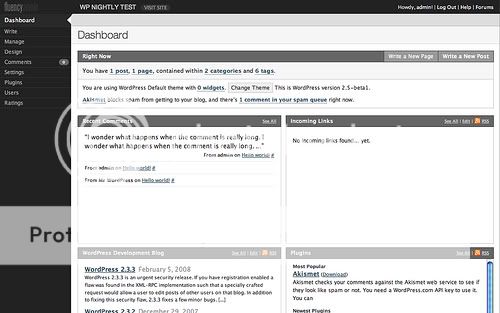
1. Fluency wordpress admin theme
Features
- Smooth grey color scheme
- Menus rearranged, main menus down left, sub menus across the top
- Easy installation
- v1.1 is fully compatible with the stable release of WordPress 2.5
- v1.2 is fully compatible with the stable release of WordPress 2.6
2. Admin Drop Down Menu wordpress admin theme
Features
- Hide the various admin menus that are splattered all over the place in WordPress 2.5
- Insert a new menu on the top dark grey bar, which is unused (wasted space!) otherwise
- Remove a few useless links on the upper right corner
- Tested with Firefox 2.x, Opera 9.x and MSIE 6
- Easy installation

3. JP Admin Stylish Blue wordpress admin theme
Features
- Keep the same default admin structure
- Professional dark blue color scheme
- Easy installation

4. Leopard Admin wordpress admin theme
Features
- Links have been moved to the sidebar with icons
- Professional design
- Easy installation

5. Baltic Amber wordpress admin theme
Features
- Create your own colour scheme by specifying only two base colours
- Have the theme colours change randomly every time you reload the page, or at any time interval you choose
- Improve the scanability of the plugin list by replacing the darker background colour with a green ribbon on the side for the activated plugins.
- Easy installation

Hint
We will get a killing wordpress admin theme when combining Fluency (#1) and Admin Drop Down Menu (#2) into one. Yeah, I’m using this admin theme

Conclusion
Customizable admin color schemes are an awesome addition to WordPress 2.5+ and you can be assured that another large design overhaul won’t be applied again any time soon.
Actually you can create your OWN wordpress admin color scheme by reading the explanations and sample code of planetozh.
Wall plugin Comment Box for Wordpress
Introduction
WP Wall is a Worpdress plug-in created by Vladimir. This plug-in will add a “Wall” widget that appears in your blog’s sidebar. Your readers can add a quick comment about the content of your blog, about yourblog design, etc … This widget make good use of AJAX hence the comment will appear in the sidebar immediately (without reloading the page).
All comments are handled by WordPress so that means you have normal comment moderation, comment notification and SPAM protection. Yes, get rid of spam !
WP Wall features:
- Comments are handled by WordPress
- RSS Feed for the Wall
- Automatically refresh turning into a chat

Download
Installation & Usage
1. Upload the whole plugin folder to the folder /wp-content/plugins/
2. Go to the Plugins page and activate the plugin.
3. Use the Options page to change your options (see the image below)
4. Add the widget to your sidebar

If you enjoyed this post, please make sure you comment
New free premium Blogger template in magazine style
This is my latest Blogger template : Simplex Darkness .
Template is in magazine style .
You can take a look :

Live Demo | Download
To install this template ,follow the steps bellow :
1,Download template and unzip . You will get file Simplexdarkness.xml and a folder of images .
2,Upload images to an image hosting service such as Photobucket or Flickr .I recommend Photobucket for its convenient in bulk uploading .
3,Open template file : simplexdarkness.xml in any word editor you have . Change link of images to where you uploaded them. You can change logo or any image if you want .
4,Press Ctr+F . Find and replace all link : http://freeblogwpthemes.blogspot.com to your blogspot URL .
5,Take a look on content blocks of template :

The image above show where sections of template are . Each section show content of a category ( or label) in your blog .
to show posts in each category ,find the code like this and change the value to your :

label ,tlabel and tittle tag from 1 to 9 are for category in sections from 1 to 9 . Find and change these value to categories you want to show .
6,Find and change value of each RSS feed ,ads place ,and video . RSS links are in the code like this picture bellow

7, Video is in the code like this :

To post video from any source in internet ,remember to encode the embed code by changing symbols like http://centricle.com/tools/html-entities/ copy the embed code to text box ,click encode and copy the result to template file .
8,you can now save your template and upload it .
9,To show posts in section8 or slideshow ,you can do two ways :
a,Add one more label "Feature" for each post you want to show in this section .
b,Find and change value of variables : label8,title8,tlabel8 to the label you want to show post in.
Patch for all browsers :
Here is Simplex Darkness template version which fixed errors in appearance in all browsers
Download here
and follow steps from 1 to 8 mentioned above . This template is modified a bit for fixing errors but install instruction is still the same .
Check it out .
Note : for people who meet trouble thumbnail is not shown : You must set your site feed to "Full" mode . Set the full mode by following some step bellow :
Login to blogger account , Go to setting ,go to Site feed tab ,in Allow Blog Feeds ,choose Full .
Template is in magazine style .
You can take a look :
Live Demo | Download
To install this template ,follow the steps bellow :
1,Download template and unzip . You will get file Simplexdarkness.xml and a folder of images .
2,Upload images to an image hosting service such as Photobucket or Flickr .I recommend Photobucket for its convenient in bulk uploading .
3,Open template file : simplexdarkness.xml in any word editor you have . Change link of images to where you uploaded them. You can change logo or any image if you want .
4,Press Ctr+F . Find and replace all link : http://freeblogwpthemes.blogspot.com to your blogspot URL .
5,Take a look on content blocks of template :
The image above show where sections of template are . Each section show content of a category ( or label) in your blog .
to show posts in each category ,find the code like this and change the value to your :
label ,tlabel and tittle tag from 1 to 9 are for category in sections from 1 to 9 . Find and change these value to categories you want to show .
6,Find and change value of each RSS feed ,ads place ,and video . RSS links are in the code like this picture bellow
7, Video is in the code like this :
To post video from any source in internet ,remember to encode the embed code by changing symbols like http://centricle.com/tools/html-entities/ copy the embed code to text box ,click encode and copy the result to template file .
8,you can now save your template and upload it .
9,To show posts in section8 or slideshow ,you can do two ways :
a,Add one more label "Feature" for each post you want to show in this section .
b,Find and change value of variables : label8,title8,tlabel8 to the label you want to show post in.
Patch for all browsers :
Here is Simplex Darkness template version which fixed errors in appearance in all browsers
Download here
and follow steps from 1 to 8 mentioned above . This template is modified a bit for fixing errors but install instruction is still the same .
Check it out .
Note : for people who meet trouble thumbnail is not shown : You must set your site feed to "Full" mode . Set the full mode by following some step bellow :
Login to blogger account , Go to setting ,go to Site feed tab ,in Allow Blog Feeds ,choose Full .
Popular Wordpress Design FrameWorks

Being that most of us are working against multiple deadlines at one time, we need to be able to save ourselves as much time and headache as possible, and help prevent ourselves from unnecessarily re-inventing the wheel. That is why frameworks are such a time and life saver in the development arena. (Actually, frameworks are simple time savers regardless of whether or not you are facing a deadline.)
These standard code containing frames come with the basic ‘shelves’ that you need for your project, you just have to now fill these ‘shelves’ however you see fit…and possibly tweak some of their settings.
Whether you use your own or one of the pre-made frameworks listed below, you will need something to prevent you from having to write the same basic code project after project. It would be like writing sheet music and having to draw the lines on the paper yourself before you started piling on the notes.
So that is where frameworks come in the picture. They cut out the perpetual repetitiveness of placing all the code that accompanies your web based WordPress projects.
All of the themes included here are completely free to use for both personal and commercial projects. For a more in depth look at what WordPress Frameworks are, see Wordpress Theme Frameworks Explained.
Child Themes
One of the benefits of using frameworks is that they allow for the creation of child themes.
WordPress child themes inherit the functionality of the parent framework of your choice. They generally only contain two files, a style.css file and a functions.php file along with any image folders, script folders and include folders necessary for the child theme.
To create a child theme simply upload the parent framework to wp-content/themes then create your css file beginning with the following code. Make sure that the “Framework Name” is the same as the name of the folder of the parent framework.
/*
Theme Name: Name
Theme URI: http://themesite.com
Description: A description of your theme goes here
Author: Author Name
Author URI: http://authorsite.com/
Template: Framework Name
Version: 1.0
*/
Tutorials and Links
- How to make a child theme for WordPress: A pictorial introduction for beginners
- WordPress Child Theme Basics
- Exploring WordPress Frameworks and Child Themes
Thematic
Thematic is a free, open-source, highly extensible, search-engine optimized WordPress Theme Framework featuring 13 widget-ready areas, grid-based layout samples, styling for popular plugins, and a whole community behind it. It’s perfect for beginner bloggers and WordPress development professionals.

For a much more bells and whistles kind of package for your framework needs, Thematic is an awesome, fully loaded WP framework for a wide range of users. Naturally, with all the extra features and included goodies, Thematic comes with a bit of a learning curve, but once you get the hang of it, you will find almost all your framework needs right at your fingertips. Not to mention the resourceful community that has sprung up around this framework ready to help out when and where they can, provides some peace of mind.
Thematic Features
- Fully Search-Engine Optimized
- Includes a sample WordPress Child Theme for rapid development
- Ready for WordPress plugins like Subscribe to Comments, WP-PageNavi, and Comment-license
- Fully compatible with All-In-One SEO and Platinum SEO plugins
- Multiple, easy to implement, bulletproof layout options for 2, or 3 column designs
- Modular CSS with pre-packaged resets and basic typography
- Dynamic post and body classes make it a hyper-canvas for CSS artists
- Editable footer text—remove the theme credit without harming the theme
- Options for multi-author blogs
Breakdown
Ease of Use: 2/5
GPL Licensed: yes
Power of Framework: 4/5
Number of Wiget-Ready Areas: 13
Documentation: 5/5
Tutorials and Links
Hybrid
Hybrid is a user-friendly, search-engine optimized theme framework, featuring 18 custom page templates and 9 widget-ready areas, allowing you to create any type of site you want.

Speaking of frameworks that have an awesome community behind it, Hybrid is one such framework where you can find extremely in depth tutorials and documentation to assist you all from the community supporting it. Want bells and whistles, too? Well, Hybrid has those as well. Along with a flexibility to be adapted to whatever type site you are looking to put together. Hybrid is another high ranker among framework users.
Hybrid Features
- Search-Engine Optimized
- Print CSS File Included
- 14 custom page templates
- Advanced action and filter hooks
- Basic Theme and Footer Settings
- 20+ Language Packs
Breakdown
Ease of Use: 2/5
GPL Licensed: yes
Power of Framework: 5/5
Number of Wiget-Ready Areas: 9
Documentation: 5/5
Tutorials and Links
WP Framework
WP Framework was created to serve as the starting point in WordPress theme development.
It accomplishes this by providing you with commonly used functions and features that modern WordPress themes should have. So when you start a brand new WordPress project, using WP Framework you’ll already have the basic functionality set so you don’t have to worry about mundane tasks like creating the loop, or recreating all the standard template files.

Let us ditch the learning curve for just a moment while we discuss the next WordPress framework, WP Framework. Catchy title, no? Anyway, WP Framework takes us back to basics so that you can get started without all the elements that often complicate the other frameworks. Even though these complications are often related to the customization factor of your project.
WP Framework Features
- Search Engine Optimized
- Modular CSS includes ( reset.css, base.css, screen.css )
- Favicon & iPhone webclip placeholder images
- Basic print.css Stylesheet ready for printing web documents
- jQuery enabled + screen.js (an empty .js file pre-loaded and ready)
- 3 sample layouts
Breakdown
Ease of Use: 4/5
GPL Licensed: yes
Power of Framework: 3/5
Number of Wiget-Ready Areas: 1
Documentation: 4/5
Tutorials and Links
Whiteboard
Whiteboard is a very basic framework of Wordpress. It is designed to speed up the process of designing and coding a Wordpress theme by eliminating the time spent on Wordpress’ back-end PHP that is used in every theme.
Whiteboard is clean, noted, and compact (only 76KB in size – unzipped!). It includes all the standard PHP tags and PHP files needed for a Wordpress theme – plus a few extras.

Once again, for the minimalist developer who likes to start with little more than the basics to build on, Whiteboard may just be the framework you are looking for. Priding itself on its relative lightweight and usability this framework focuses on providing the basic WP PHP code for the back end without the excess that tends to gum up the works and slow things down for the user.
Whiteboard only includes the basic back-end PHP, a CSS reset and a list of all of the DIVs included. One of the most basic frameworks available.
Whiteboard Features
- Categories Page Template
- Archives Page Template
- Pagination Posts
- Socialization Links
- A list of all the included divs
Breakdown
Ease of Use: 5/5
GPL Licensed: no (licensed under Creative Commons BSD)
Power of Framework: 2/5
Number of Wiget-Ready Areas: 1
Documentation: 1/5
Tutorials and Links
Sandbox
Sandbox is a powerful tool available for WordPress theme designers and developers. The Sandbox can be easily designed just with CSS, so beginners will feel comfortable not bothering with PHP.
Experienced developers and designers can accomplish almost anything with minimal work, thanks to the rich, semantic markup and profusion of classes dynamically generated by the Sandbox.

The next framework I wanted to take a look at is Sandbox. This framework has strong appeal to two different classes of user. Those profficient developers who can comfortably manipulate the PHP, and therefore, they can easily tweak this framework to make it fit their needs. And those beginners who would rather just focus on the CSS end of the framework, and leave the PHP as written. Either way, this dynamic framework is an awesome starting point.
Sandbox Features
- Full Widgets compatibility
- Valid XHTML 1.0 (Transitional)
- The basis for your own GNU GPL-licensed theme
- You can totally customize it with CSS alone—no need to bother with other files.
Breakdown
Ease of Use: 3/5
GPL Licensed: yes
Power of Framework: 4/5
Number of Wiget-Ready Areas: 2
Documentation: 4/5
Tutorials and Links
- Using The WordPress Sandbox and The Blueprint CSS Framework Together
- Getting a sandbox theme running on wordpress.com
Buffet
Buffet is a theme framework designed not only for the theme developers who will be using the theme actions and filters to create the child themes, but also for the end users who would be able to add and remove what they want.
Another key feature of this framework is the usage of extensions. Theme developers can group a set of action and filter functions into a class and register it as a theme extension. With it, users of the child theme itself can enable/disable that extension easily whenever they want via the options panel.

Buffet is another powerful framework tool focused more for theme developers, and also loaded with another steep learning curve. Loaded with features, this flexible framework offers developers so many options when constructing their themes that not only simplifies things for the developer, but allows for easy customization by the end user as well. Buffet’s strength and the amount of modifaction it allows by both parties involved, make the learning curve that it comes with worth the tackle, especially if you are all about developing themes.
Buffet Features
- Search Engine Optimization
- jQuery powered comments form, SuperSleight for IE6, Superfish menus and jBreadcrumbs included
- Packaged with CSS Frameworks – comes with 960gs and Blueprint CSS
- Theme Options – organized in tabs, with features such as custom RSS feed links and custom footer messages
- Theme Extensions – allow end-users to enable/disable features using the extensions feature
Breakdown
Ease of Use: 2/5
GPL Licensed: yes
Power of Framework: 5/5
Number of Wiget-Ready Areas: 4
Documentation: 4/5
Tutorials and Links
That is all from this end…
That is pretty much all I had to say on the subject, but that does not mean there isn’t more to say. So leave your thoughts in the comment section to share your two cents. Ever used one of the frameworks mentioned above? What did you think of it?
Web application and graphic designers.
Adobe AIR is a great platform to build efficient and cutting edge desktop applications, that work on any operating system.
In the last few years, hundreds of very useful applications have been built on AIR for all sorts of purposes. Here we focus our attention on apps built for web and graphic designers.
This list only contains applications that have proven to be dependable and useful for designers. We’ve split it up into these sections:
- Creating Graphics
- Design-Specific Tools
- Editing Images
- Taking Screenshots
- Productivity Tools
- Image Sharing Tools
- Multimedia Apps
Creating Graphics
1. Splashup Light:
Splashup Light is a casual desktop based image editor. It provides a lot of features to enhance, manipulate and edit your photos with minimum effort.

2. Color Lovers:
Color Lovers offers a desktop color finder for searching the ColorLovers community database. Using this app you can search from over 1 million named colors and 300,000 user created color palettes.

3. Contrast-A:
Contrast-A allows you to check for contrast, experiment with color combination and interact with a 3 dimensional RGB color space.

4. LiveBrush:
LiveBrush is a drawing app that lets you create extra-ordinary graphics by combining simple motion controls with creative brush styles.

5. Icon Generator:
Icon Generator allows you to create stylish icons with minimum drawing abilities. Just select the type of icon you want, customize the text and color and create your icon.

6. e2vector:
e2vector is an illustration tool with powerful features like layers, masks, gradients, intersection and path splicing. It also allows you to import/export SVG files.

7. ColorPicker:
Using ColorPicker you can either pick a color from a color grid or design a color using sliders to adjust the RGB values of a color. An essential tool for somebody trying to play around with colors.

8. ColorBrowser:
ColorBrowser is a simple app to organize your favorite color palettes locally. You can import color palettes that you have created elsewhere in the form of ASE files.

9. Kuler:
Kuler is probably the most popular design app for AIR. Kuler lets you generate color themes for any project and browse through thousands of themes created by the Kuler community. It lets you experiment with color variations without any hassle to design your new project.

10. Random Pattern:
A cool app that creates color patterns based on your given parameters.

There are a tonne of great apps out there for Air. We’ve compiled our favorites here, but are there any we’ve missed? Which apps do you use?
Great Sites Using Wordpress Theme And CMS Review

Wordpress is the very customizable and developer friendly. You can make just about any website you have in mind with it; blog, portfolio, gallery, e-store, etc.
WordPress is much more than just a blogging platform. If you still see it that way, you will change your point of view after seeing these great sites using WordPress as a CMS.
Click on an image to see the site in full!
1. The Ford Story

2. UX Booth

3. OurLife
4. Network Solutions
5. Texas Tech Tody
6.Tumberline Lodge 
7.Department of Environmental Sciences
8. Outreach Magazine
9. Boys and Girls Club of the Midlands
10. BigGovHealth

Hope you like the collection , if you know some inspiring sites like these then please share them with us!
Free Premium-Quality Wordpress Themes
Prologue
Prologue allows you to create your own Twitter like microblogging platform.

Features
- Threaded comment display on the front page
- In-line editing for posts and comments
- Live tag suggestion based on previously used tags
- A show/hide feature for comments, to keep things tidy
- Real-time notifications when a new comment or update is posted
Agregado
Agregado is made unique by its built-in lifestream module and contact form with custom control panel options.

Features
- Lifestream module with carousel
- Custom archives page
- Animated js dropdown menus
- Built-in contact form module with AJAX sent/fail message
- Built-in drop caps for lead paragraphs
- Numerical pagination on archive and search pages
- Author-highlighting for comments
- User profile module
- Widgetized bottom bar on homepage
- Widgetized sidebar on single post pages
- Print stylesheet
- ‘More in this Category’ sidebar module
- Control panel options for lifestream and contact form
Delta
Delta is a Wordpress theme designed with churches in mind. Including a few additional header images with the download, this theme is designed to allow for maximum user customization.

Subscribe to:
Posts (Atom)

 Posts
Posts


